Thursday, 21 June 2018

How to hide a file using image file (steganography)


You can easily hide a file in inside the image this method called as steganograph.
It's a technique using which we can exchange data across the world over internet
without using any encryption or decryption method.


Step 1:

Create new folder in your system and move the file and image to same folder

Step 2:

Make rar or zip for which file you want to hide

Step 3:

Open the comman prombt

Step 4:

Go to the folder location

eg: d:\sample folder\>

Step 5:

enter the following command

copy /b sample.jpg+sample.rar sample1.jpg


Step 6:

Now finished the process and  check the image size of sample1.jpg


(if you have any clarification and details pls comment)

How To Crack Forget Windows Password


No worry about If you forget any kind of windows password. Just follow these simple steps


Step1:

Boot the windows CD or USB

Step 2:

Then proceed the basic steps just click next

Step 3:

Click Repair your computer in installation page


Step 4:

Select your operating system in recovery option


follow steps and select command prompt and change the utilman.exe to cmd.exe


move d:\windows\system32\utilman.exe d:\windows\system32\utilman.exe.bak

copy d:\windows\system32\cmd.exe d:\windows\system32\utilman.exe


In windows 10 system after starting windows boot just press shift + F10

Step 5:

Restart the system and go to login page click utilmanager and command prompt will be open


Step 6:

Now check the user groups and add the new user

c:\net user username *

c:\net localgroup administrator useraxian /add


Step 7:

Once its finish access the useraxian login with administrator rights then you have manage the password.

Wednesday, 20 June 2018

How to increase system perfomance within 5 minutes


Now a days most of tech people facing system performance issues. we identify some solution for the issues


Step 1:

Goto temp and %temp% folder and clear the folder

(there are two temp folder available first one system temp folder and another one is user temp folder
user temp folder mentioned as %temp%)


Step 2:

Goto prefetch folder and clear the folder


Step 3:

Goto recent folder and clear the folder

Step 4: 

Goto windows folder and select C drive properties and perform the disk cleanup


Step 5:

Goto taskmanger and kill the not responding program

Step 6:

Check your Desktop folder size system in user folder if it is excess than KB's remove unwanted files and move to other folder and keep shortcut files only.( if it is excess than KB's definitily affect your computer speed and performance)

Step 7:

Unselect the unwanted apps in startup using msconfig


Step 8:

If these steps are not happen in your system Finally increase your RAM size for high performance.

How to disable windows 10 update


Solution 1


Step 1:

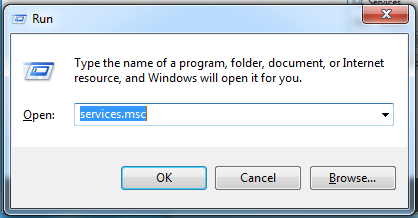
Press windows key + R at the time


Step 2:

Type services.msc and press enter

Step 3:

services windows will be open and scroll down and select windows update service


Step 4: 

Change the startup type and select disabled option and click ok


Solution 2


Step 1

Press windows key + R at the time

Step 2:

Type gpedit.msc and press enter

Step 3:

Select Administrative templates in computer configuration

Step 4:

Then select windows components and windows update

Step 5:

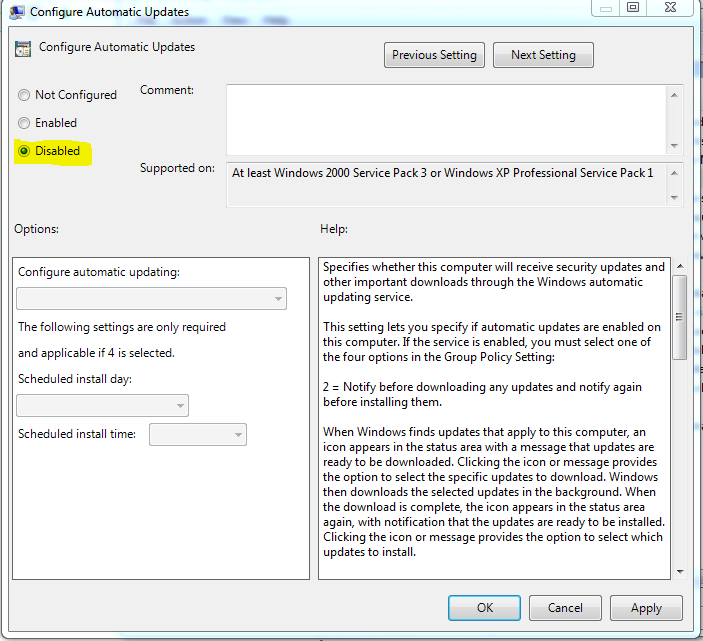
Then double click the configure automatic updates


Step 6:

Normally default option is not configured so now move on to disabled and click apply and ok


Monday, 30 April 2018

CRACK FORGET PASSWORD IN APPLE MAC


STEP 1:

Press the power button and holding down Command + R. The Mac will boot into Recovery mode.

STEP 2:

When you see the load bar appear you can let go of the keys. It may take a few minutes to load.
Select Disk Utility and press Continue.

STEP 3:

Choose Utilities > Terminal.

STEP 4:

Enter the command in terminal resetpassword  and press Return.

STEP 5:

Select the volume containing the account (normally this will be your main hard drive).

STEP 6:

Choose the account to change with Select the User Account.

STEP 7:

Enter a new password and re-enter it into the password fields and Click Save.

STEP 8 :

A warning will appear that the password has changed, but not the Keychain Password. Click OK.

STEP 9:

Click Apple > Shut Down.

STEP 10:

Now start up the Mac. You can log in using the new password.

Courtesy : macworld

Sunday, 22 October 2017

How to Fix a BCD ERROR 'Boot Configuration Data File is Missing'


Step 1:

Insert your bootable os media to Laptop or Computer

Step 2:

Enter to the installation mode and click next.

Step 3:

Select repair your computer option left down side corner of the page


Step 4:

Select trouble shoot option and then select advanced option

Step 5:

Select the command prompt and type the following commands


x:\Sources> Bootrec /fixmbr
x:\Sources> Bootrec /fixboot
x:\Sources> Bootrec /scanos
x:\Sources> Bootrec /rebuildbcd

Select the option A for all

Step 6:

Type Exit and select continue option.


Saturday, 22 July 2017

How to config Login page in phpMyAdmin


Step 1:

Create new user in phpmyadmin or use the already created user

Step 2:

Go to phpmyadmin folder in xampp or wamp

Step 3:

Open the config.inc.php and check the authentication type information

Step 4:

Change the authentication type value 'config' to 'cookie'

$cfg['Servers'][$i]['auth_type']  = 'config';

to

$cfg['Servers'][$i]['auth_type']  = 'cookie';

Step 5:

Just refresh the phpMyAdmin page and now showing the login page